
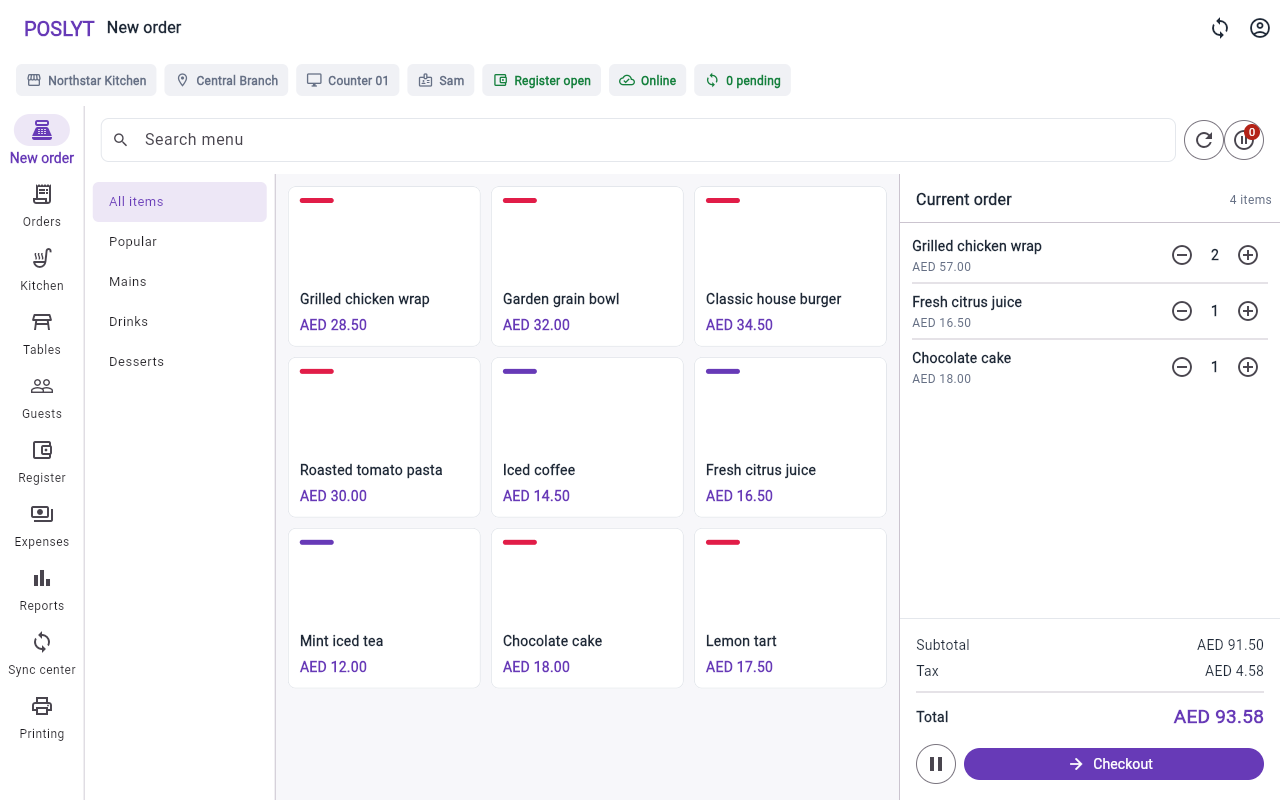
Start with the busiest billing path
Ask a vendor to complete a realistic order from menu search through payment and receipt. The current cart, quantities, service type, discount permission, tax, and total should remain easy to inspect. Test both counter and phone layouts if staff move around the venue.
Follow the order into the kitchen
Confirm that the KOT retains order type, table where applicable, quantities, modifiers, notes, and a usable sequence. Check what happens when a printer is unavailable and whether kitchen work remains visible elsewhere.
Test connectivity honestly
Disconnect the terminal during a demo. Identify which actions continue locally, which require connectivity, how pending commands appear, and how duplicate orders or payments are prevented during retries.
Review register and branch control
Open a register, record a cash movement, complete payments, add an expense, count the drawer, and close the session. For multiple branches, verify that menus, staff permissions, terminals, and reports remain correctly scoped.
Validate your own tax and receipt setup
Configurable tax fields are not the same as regulatory certification. Have your accountant or advisor review the configured currency, tax values, receipt fields, and reporting before launch.